Sundays can be a whirlwind for families who serve together. Between getting everyone out the door, making sure the kids are in the right classrooms, and heading to your own volunteer posts, church service is incredibly rewarding—but it can also be logistically complex. If you have a teenager playing guitar on the youth worship team, a spouse greeting at the front doors, and you are teaching Sunday school, coordinating everyone’s schedules can quickly become confusing.
We understand this challenge. Families want to serve their church communities faithfully without the friction of mixed-up schedules and miscommunications. That’s why we are thrilled to introduce People Groups—a powerful new feature designed to bring clarity, coordination, and peace of mind to families and volunteer cohorts serving at the same church location.
Empowering Parents and Caregivers (With Respect for Privacy)
For parents and caregivers, keeping track of multiple children’s service schedules is no small feat. Each child might have distinct availability, different serving rotations, and unique scheduling rules. In the past, trying to manage all these moving parts meant logging into multiple accounts or sorting through endless email notifications.
People Groups simplify this entirely. By creating a family group, a designated group administrator—such as a parent or caregiver—can view and help manage the family’s commitments in one unified place. You can oversee family members’ availability, adjust scheduling rules, and review everyone’s upcoming assignments without the usual friction.
However, we also know that flexibility, privacy, and individual autonomy are vital. Becoming a group admin does not automatically grant you access to manage everyone’s calendar. A member must explicitly grant the appropriate permissions before a group admin can manage their schedule or availability. This means you can easily oversee the schedules of your younger children who have given you access (or for whom you’ve set up accounts), while fully respecting the independence of older teens, a spouse, or adult family members who prefer to manage their own commitments and simply want to share their schedule for visibility.
A Clear View of Your Volunteer Commitments
Once a People Group is established and the necessary permissions are granted, managing your family’s involvement becomes wonderfully straightforward. The new People Group view provides a clear, comprehensive snapshot of upcoming assignments for everyone in your circle.
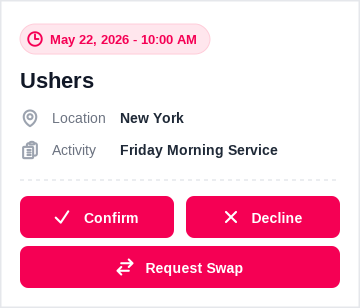
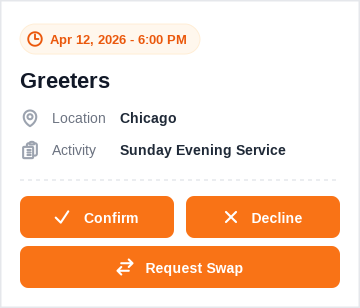
At a glance, you can see exactly who is serving and where they are assigned. The dashboard clearly displays whether assignments are pending or confirmed, ensuring no one accidentally misses a scheduled Assignment. Furthermore, the People Group view highlights relevant pending swap requests. If a sudden schedule conflict arises—like a family illness or a last-minute trip—an authorized parent or caregiver can seamlessly review and help coordinate those shift changes.
Importantly, being in a group together does not mean everyone is treated identically by the schedule maker. We know that every volunteer is unique. Group membership fully respects each individual’s distinct skills and roles. For example, your teenager might be highly trained to run the lighting board, while you might be eligible for the hospitality workgroup. Members always retain their own unique scheduling rules, activity preferences, and workgroup eligibility. Grouping simply makes it easier to view these diverse commitments side-by-side, ensuring that your family’s unique talents are utilized without causing scheduling conflicts.
Beyond Families: Serving With Friends
While People Groups are a game-changer for parents and caregivers, they aren’t just for families. Serving is often more joyful when done alongside people you know and love.
Perhaps you have a close-knit small group that wants to serve in the children’s ministry together, or a cohort of college students who prefer to coordinate their ushering schedules so they can carpool to the building. People Groups allow friends and other volunteer cohorts to link up and coordinate their availability. To keep these groups manageable and focused on close coordination, family groups can accommodate up to 20 members, while other types of volunteer groups can include up to 15 members. No matter how you define your group, it’s a fantastic way to foster community and ensure you get to serve alongside the people you care about.
Inviting New Volunteers vs. Adding to a Group
As your group grows, you might want to bring new people into the fold. It’s important to note how our system handles adding members to ensure security and proper onboarding.
You can only add individuals to a People Group if they are already existing volunteers at your specific church location. You cannot add outside users directly to a group.
If you want to recruit a friend, neighbor, or family member who isn’t volunteering yet, you can use the separate “Invite Someone to Serve” option. This feature sends them a dedicated invitation to join your church’s volunteer team. Once they accept the invitation, complete any necessary onboarding, and become an established user at your location, they can then be found in the system and easily added to your People Group.
Start Coordinating Today
At ChurchScheduling.com, our goal is to remove the administrative hurdles that get in the way of serving, allowing you to focus on what truly matters: ministry, community, and connection. People Groups give you the tools to coordinate your family’s or friends’ commitments with ease and transparency, all while respecting everyone’s individual preferences and permissions.
We can’t wait for you to try this new feature. Log in today to set up your first People Group, or reach out to your church’s scheduling administrator to learn more about how to make the most of your volunteer experience!